Speed-up your XP – Optimize Display Settings

Advertisements

Pentru unii utilizatori ai sistemului de operare , performanta sistemului este totul. Windows XP are cateva efecte vizuale care pot fura ochiul, insa activate, acestea “fura” si din viteza de reactie a sistemului. Daca nu tineti neaprat ca monitorul dvs sa abunde de efecte vizuale si doriti sa optimizati performanta sistemului dvs, aveti posibilitatea sa o faceti prin cativa pasi simpli:

Accesati Control Panel (din meniul afisat de butonul de Start) si dati click pe iconita de System (Performance and Maintenance).
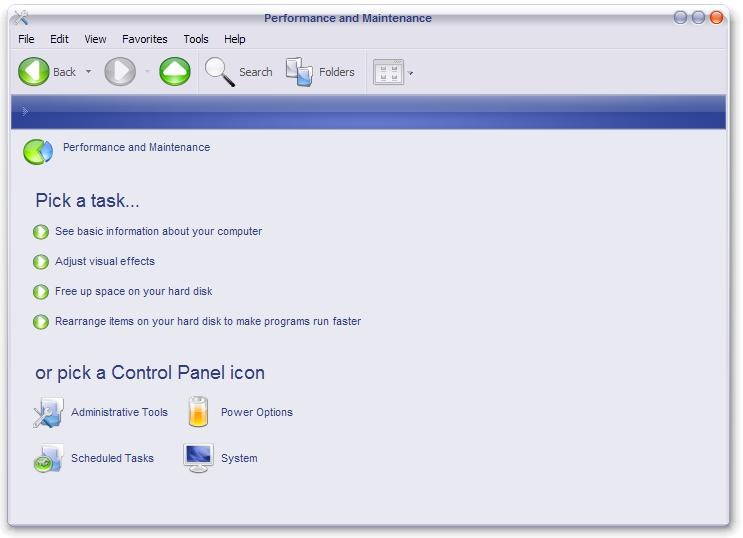
performance_maintenance

In fereastra deschisa selectati tab-ul Advanced, apoi dati click pe butonul de Settings din panoul Performance.
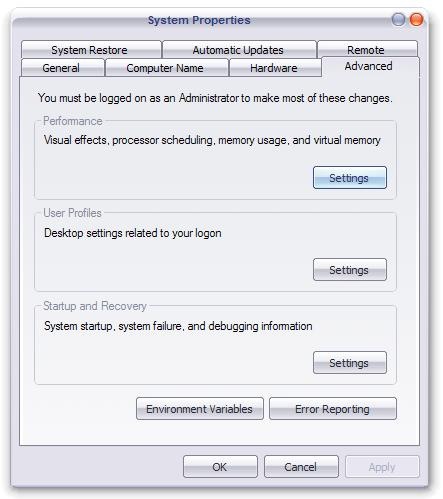
system_properties

In Performance Options, dati click pe tab-ul Visual Effects, selectati Custom si bifati doar optiunile:

  • Show shadows under menus
  • Show shadows under mouse pointer
  • Show translucent selection rectangle
  • Use drop shadows for icons labels on the desktop
  • Use visual styles on windows and buttons
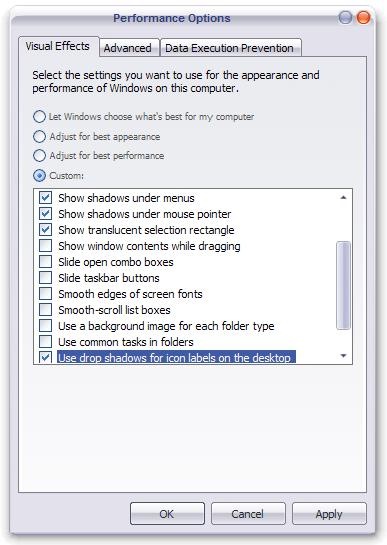
visual_effects

Apply si OK.

Pentru o performanta optima, dar fara nici unefect vizual, in tab-ul Visual Effects selectati Adjust for best performance.

Advertisements

COMENTARII

Un comentariu la: Speed-up your XP – Optimize Display Settings #

Scrie un comentariu

Stealth Settings Terms:

cum sterg xp home security, nastevenie basov v aimp, marire performante windows aero, creste performanta windows 7, cum se mareste performanta windows 7, marire viteza de rulare windows 7, xp görsel efekt ayarları, ταχυτητα υπολογιστη, programe de marire viteza de rulare windows 7, marirea performantei laptopului, taxitita.vista, nastavenie priehladne popisi ikon na xp, cum creste performanta la window 7 la grafica, mareste viteza la net windows 7 pe laptop, ajustare performanta pc, windows görsel efekt ayarı düzeltme, cum sa maresc graficala laptop, performanta desktop pentru windows aero, cum scap de sagetile de pe shortuc din vista, sterge icona reciclen bin on desktop, visty prohlizec chce rizeni uzivatelskych uctu, cum sa-mi sporeasca performanta desktop pentru windows aero, tabul visual effects in windows 7, windows 7 özelleştir efekt, cum maresc desktop performance for windows aero, cum maresc performanta deskop pt windos aero, vistada görsel efekt, cum maresc grafica pc, slide performance, ako upraviť efekty vo windows 7,
RomânăEnglishFrançaisItalianoDeutschEspañolNederlandsČeštinaΕλληνικάTürkçePortuguêsРусскийSlovenčinaNorskPolski